Phala Cloud is the managed version of dstack deployment that enables developers to deploy programs to CVM (Confidential VM), and to follow the security best practices by default.The dstack SDK simplifies deploying programs to CVMs (Confidential VMs) with security best practices built in. Explore dstack’s blockchain-verified computing capabilities and architecture. The main features include:
- Deploy any Docker container as a CVM on supported TEEs
- Generate remote attestation reports and visualize the chain of trust via Web UI
- Wrap HTTP services with automatic RA-HTTPS and content-addressed domains (
0xABCD.dstack.host) - Keep applications portable across hardware via decentralized Root-of-Trust key management
.png?fit=max&auto=format&n=57prl00-u-jQKn3n&q=85&s=83135271ccb857f0fe97dc3b11789f94)
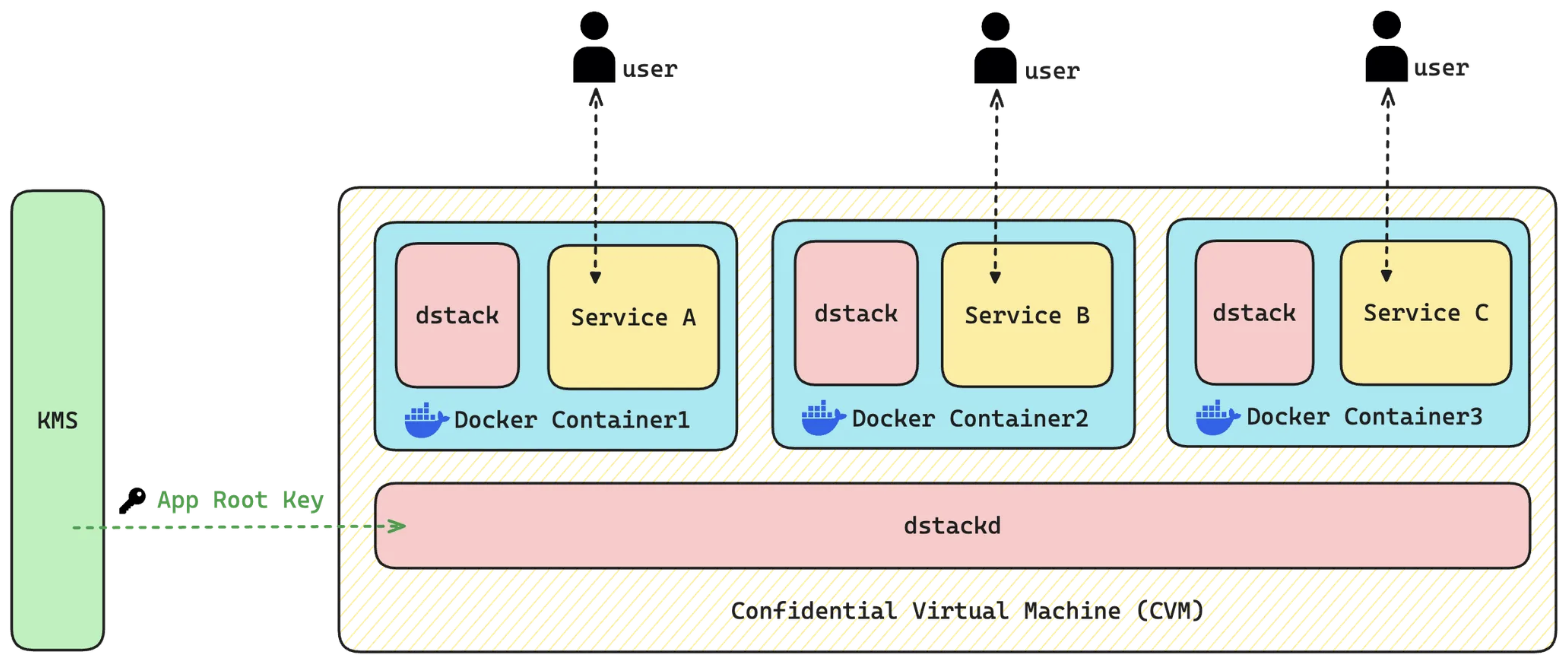
dstack component to communicate with the underlying tappd. dstack sets up the CVM environment, handles remote attestation, and manages the lifecycle of all Docker containers running inside the CVM.
tappd communicates with a decentralized Key Management Service (KMS) that derives deterministic encryption keys for the application. These keys encrypt application-specific storage and protect data integrity. Because the KMS operates independently from any specific TEE instance, your applications avoid vendor lock-in and can be securely migrated between different hardware environments without data loss.