

What Are Nitro Enclaves
AWS Nitro Enclaves provide process-level isolation on EC2: the host OS cannot read or write enclave memory, even with root access. dstack-cloud packages your application into an Enclave Image File (EIF) and usesdstack-util for attestation and key retrieval — replacing the Guest Agent used on GCP.
Key properties:
- Memory-isolated: The host OS cannot read or write Enclave memory
- No persistent storage: Every Enclave launch starts from a clean state
- No external network access: Enclaves communicate through VSOCK (a socket interface to the host machine)
- Cryptographic attestation: AWS Nitro Secure Module (NSM) generates an Attestation Document proving the Enclave’s identity
How dstack Uses Nitro Enclaves
The Nitro integration differs significantly from GCP. On GCP, dstack-cloud deploys a full virtual machine (dstack CVM) with a Guest Agent. On AWS Nitro, the workload runs inside an AWS Enclave OS image — there is no Guest Agent and no dstack OS.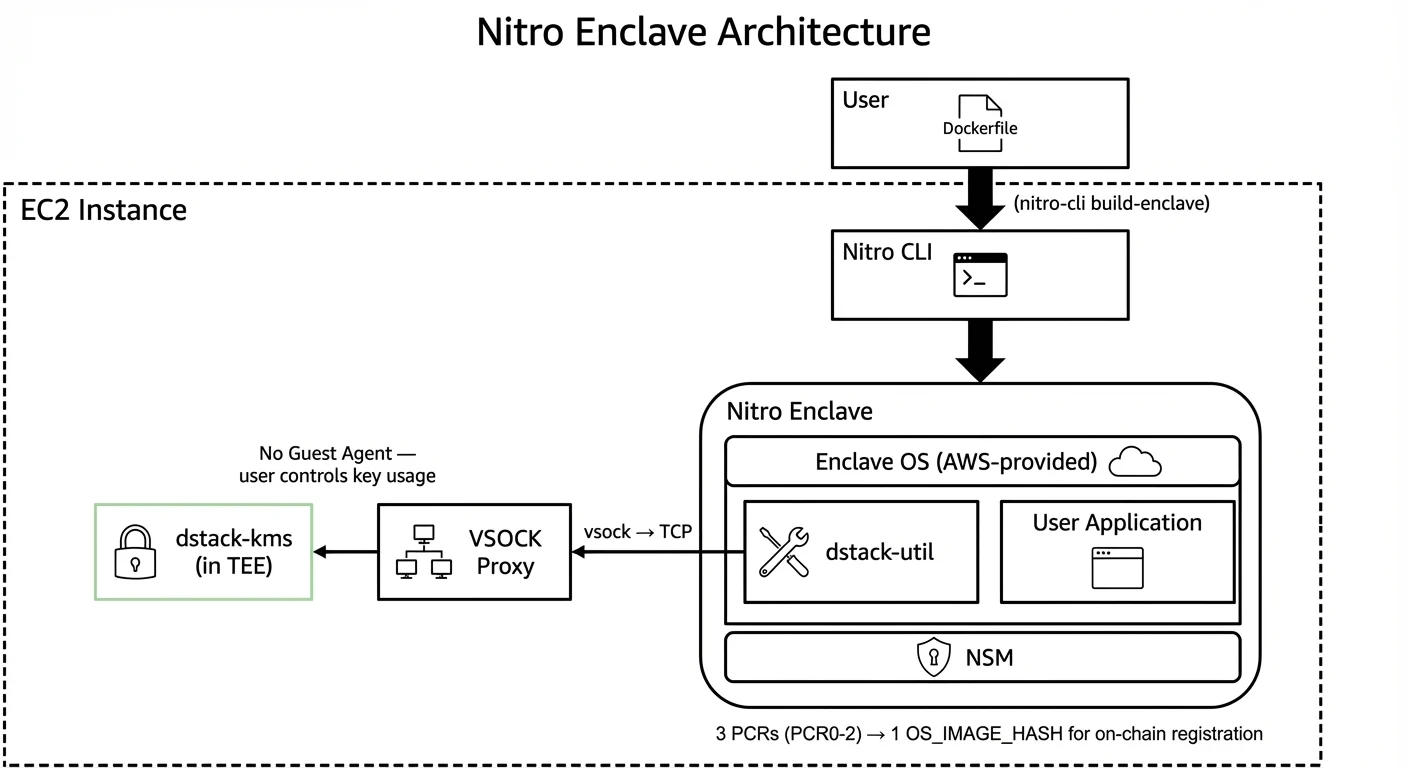
- You define your application in a
Dockerfile - AWS Nitro CLI (
nitro-cli build-enclave) converts the Dockerfile into an Enclave Image File (EIF) — the Enclave OS image - dstack packages
dstack-utilinto the EIF. This tool handles attestation and key retrieval from KMS - The Enclave runs your application code inside the AWS-provided Enclave OS — not dstack OS
- Inside the Enclave,
dstack-utilcommunicates with KMS through the VSOCK proxy on the host to obtain keys - Your application decides how to use the key (e.g., encrypting disk in-memory, decrypting model weights, etc.)
Key Differences from GCP
Enclave Image (EIF) Build Process
A Nitro Enclave is launched from an Enclave Image File (EIF). The build process has two stages:Stage 1: Build Docker Image
First, build a Docker image from your Dockerfile:dstack-util.
Stage 2: Build EIF from Docker Image
Then, convert the Docker image into an EIF using the Nitro CLI:- Uses the AWS-provided Enclave OS as the base
- Packages your Docker image content into an EIF
- Generates 3 PCR values (PCR0, PCR1, PCR2) that uniquely identify the image
Stage 3: Register OS_IMAGE_HASH
The 3 PCR values are combined into a singleOS_IMAGE_HASH for on-chain authorization:
OS_IMAGE_HASH must be registered via governance before KMS will deliver keys to this Enclave.
Note: Any change to the Dockerfile, application code, ordstack-utilversion produces different PCR values and a differentOS_IMAGE_HASH.
Automated Deployment
In practice, these steps are automated by deployment scripts. See Run a Workload on AWS Nitro for the full workflow using thedeploy_host.sh and get_keys.sh scripts.
Key Retrieval with dstack-util
On Nitro,dstack-util replaces the Guest Agent for key management. It is a lightweight tool that:
- Obtains the Enclave’s attestation document from NSM (Nitro Secure Module)
- Sends the attestation to dstack-kms through the VSOCK proxy
- Receives the requested key if the attestation is valid (and the measurement is authorized on-chain, when using On-chain KMS mode)
- Makes the key available to your application (e.g., via stdout, file, or shared memory)
Note: Unlike GCP where the Guest Agent automatically handles disk encryption, on Nitro you are responsible for deciding how to use the key. Common patterns include encrypting model weights in memory, decrypting configuration secrets, or encrypting a RAM-disk.
Networking and Communication
Nitro Enclaves have no direct network access. All communication goes through VSOCK: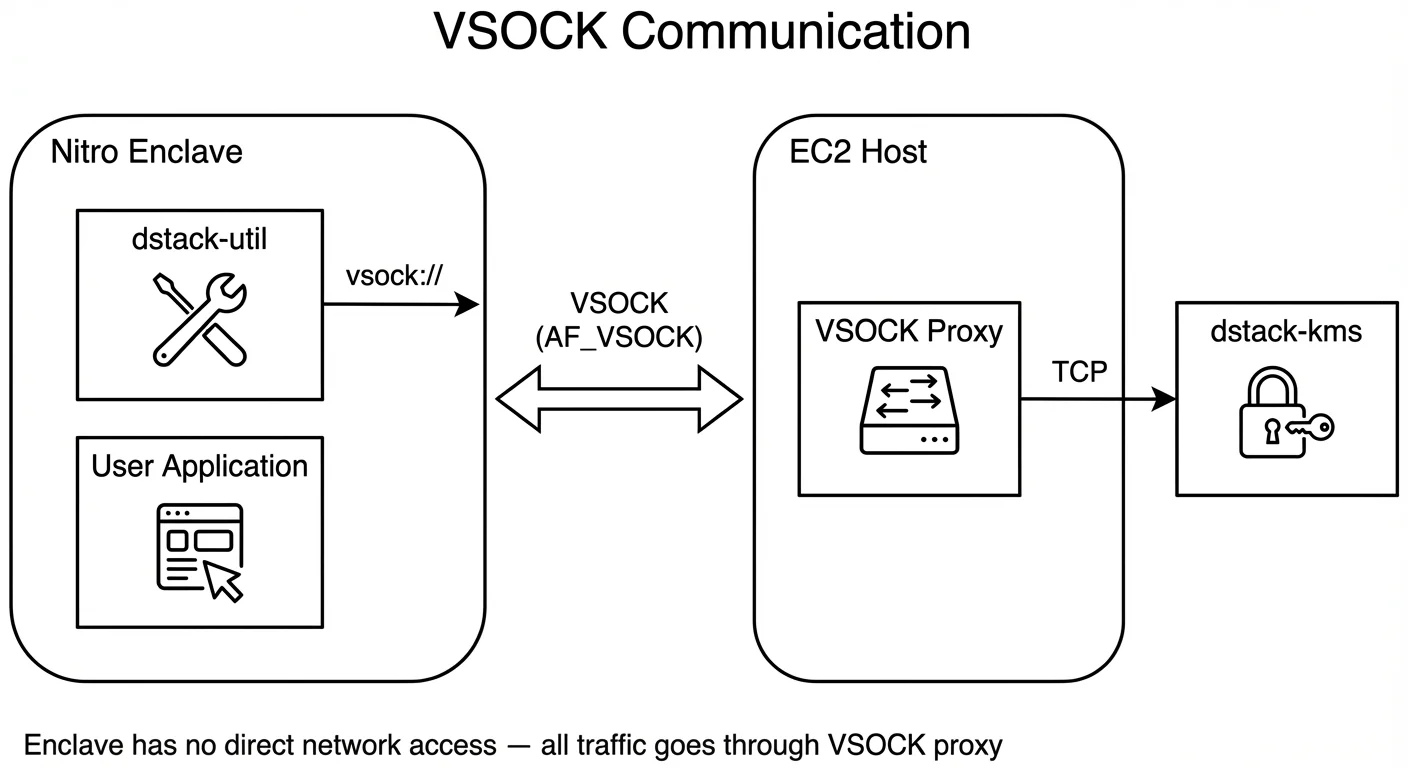
- The Enclave communicates with the host via VSOCK (AF_VSOCK socket family)
- A VSOCK proxy on the host forwards TCP connections to the outside world (including KMS)
- The proxy must be started before the Enclave launches
- If the proxy crashes, the Enclave loses external connectivity
VSOCK Proxy Setup
The VSOCK proxy translates between VSOCK (Enclave↔Host) and TCP (Host↔Network):Resource Constraints
Nitro Enclaves have static resource allocation:Supported EC2 Instance Types
Nitro Enclaves are supported on instances built on the AWS Nitro System. Common choices:
Note: The EC2 instance must have Nitro Enclave support enabled in its Nitro configuration, and you must allocate enough CPU/memory to accommodate both the host OS and the Enclave.
When to Use Nitro vs. GCP
Choose AWS Nitro Enclaves when:- Your existing infrastructure is on AWS
- You need the strongest possible isolation (process-level, no host access)
- Your workload fits within static resource limits
- You don’t need persistent disk storage or you want to do it with the key by yourself
- You want full control over how keys are used (encryption strategy, key usage pattern)
- Your existing infrastructure is on GCP
- You need automatic disk encryption managed by dstack-cloud
- You need direct network access without a VSOCK proxy
- You need persistent disk storage
- You need elastic resource allocation
- You prefer a more managed experience with the Guest Agent handling attestation and key lifecycle
Next Steps
- Quick Start: Deploy on AWS Nitro — Hands-on tutorial
- Run a Workload on AWS Nitro — Detailed deployment guide
- Attestation Integration — How attestation works on Nitro